Why ctxd: Let the agent grep
TL;DR
Use ctxd. It is simpler and cheaper, and it works just as well, if not better.
Frequent updates, tight budgets, latency targets. Fewer moving parts, fewer ways to break.
| Dimension | ctxd | Embedding RAG |
|---|---|---|
| Setup complexity | Simple. Copy text and retain paths. | Multiple stages. Split text, embed chunks and maintain a vector index. |
| Tuning | None. | Chunk size and overlap, embedding model, retrieval depth and optional reranking. |
| Embedding compute and API cost | Free. No embedding generation or embedding API fees. | Paid compute. CPU/GPU time for embedding and re-embedding. Hosted APIs and indexes add service fees. |
| Query latency | No embedding step. Text scans and repeated agent turns can add latency. | Indexed lookup. Query embedding and optional reranking add latency. |
| File updates | Instant after sync. Updated text is searchable without re-embedding. | Time + compute cost. Rebuild affected chunks, re-embed changed text and update the index. |
| Vocabulary matching | Pattern-based. The agent must supply useful terms or try alternatives. | Similarity-based. Can retrieve related wording without an exact term match. |
Free software still uses compute and storage. The agent’s model can add usage charges with either approach.
Speed depends on corpus size, hardware, caching and the agent’s search strategy. These are architectural trade-offs; end-to-end performance still needs benchmarking.
You ask an agent how to roll back a deployment after its health checks fail. It finds a line about restoring the previous image. But the instruction immediately above it says to stop the rollout first.
The agent needs a way to read beyond the match. Grep first search. No embeddings. That is our starting point for ctxd: searchable text, source paths and tools the agent can call again.
ctxd’s local tracker keeps selected folders available through ctxfs. Your application gives the agent tools to inspect paths, search text and read source files. The agent chooses the queries.
What an embedding engine adds
Embedding-based retrieval usually splits text into chunks, encodes them as vectors and maintains an index. Each layer brings decisions: where chunks end, which embedding model to use and how to keep the index current.
We want to start with searchable text and source reads. Follow the same runbook through preparation, a question and a source edit.
01Prepare files
ctxd

Embedding RAG
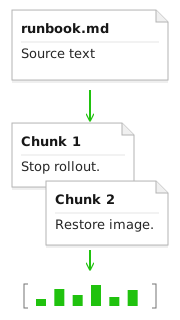
- Chunk the document. Split the source into passages with overlap. ctxd keeps a searchable text copy with its path; it does not need this chunking stage.
- Embed the chunks. Encode each chunk, then store its vector and source ID in an index. The chunking rules and model determine this representation.
02Ask a question
ctxd

Embedding RAG
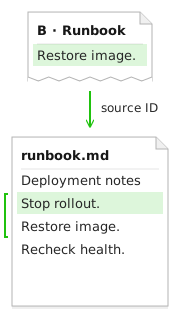
- Embed the question. RAG encodes the question for similarity search. On the left, ctxd matches a pattern and reads the source.
- Find candidates. The vector search returns three candidates: a runbook, unrelated UI notes and an old deployment procedure.
- Fetch chunk text. Open the candidate passages. “Undo an edit” looks related, but it does not explain a deployment rollback. Some stores return this text with the search.
- Rerank the chunks. The runbook moves to the top. The other candidates fall away. Reranking adds another model pass in this example.
- Read the source document. Follow chunk B back to the runbook. The preceding line supplies the prerequisite: stop the rollout before restoring the image.
03Change a file
ctxd

Embedding RAG
- Read the changed text. One line changes. ctxd refreshes its text copy after a successful scan; RAG must also refresh the representations derived from that text.
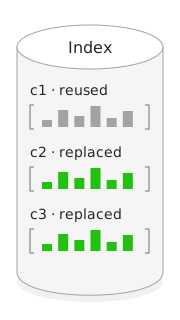
- Rebuild affected chunks. The edit crosses an overlap: c2 and c3 both change. c1 stays intact. Different splitters can shift further boundaries.
- Re-embed changed chunks. c2 and c3 need new vectors. c1 can reuse its existing vector when the pipeline supports reuse.
- Update vectors and source links. Keep c1, replace c2 and c3, and reconcile source IDs. The index must agree with the current file.
Finding the words to search
The weakness of grep-first search is the starting vocabulary. “Undo a deploy” may miss a file that says “rollback.” Searching for RUNBOOK will not find a file just because a reader would call it a runbook. Regex matches text patterns; it does not infer that meaning.
Today, an agent can list folders and paths, read headings, and try alternatives such as rollback|revert|undo. It can use terms discovered in one source to search the next. ctxd exposes those operations; the calling agent supplies the vocabulary and judges the evidence.
Our direction is to make that discovery loop easier to guide and inspect: choose a useful scope, try candidate terms, read evidence, then refine. Automatic vocabulary expansion is not part of the local search engine. The ctxfs guide describes the available read operations.
Read around the match
A regex can find an error code, a service name or a phrase. The result gives the caller a file path and line number to inspect.
In this example, searching for rollback finds line 3. Reading the surrounding passage reveals the step that comes before it.
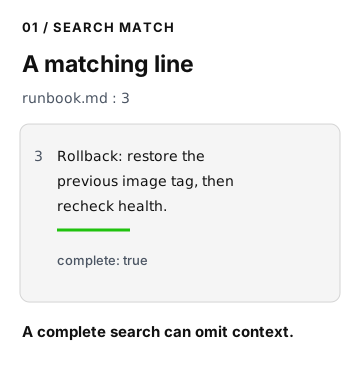
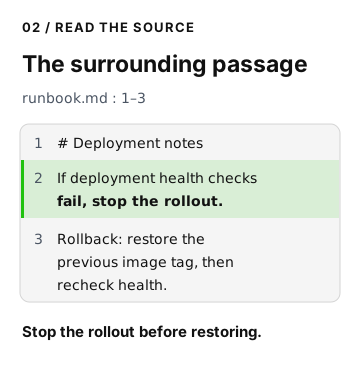
That read may reveal another file or a term worth searching. A caller can narrow the next query to a folder or path prefix. The agent follows the evidence, and developers can inspect its sequence of calls.
Try the two calls
Use the local service from the quickstart. The example calls its ctxfs API to find a line, then read its context.
Create and track the example file
On your workstation, as your normal user, start in a directory where ctxd-thesis-example does not exist:
mkdir ctxd-thesis-example && cat > ctxd-thesis-example/runbook.md <<'TEXT'# Deployment notesIf deployment health checks fail, stop the rollout.Rollback: restore the previous image tag, then recheck health.TEXTTrack this folder using the quickstart. Wait for a successful scan. Find its root ID with ctxd folders list and the service URL with ctxd config show.
Replace <ROOT_ID> below with that folder’s ID. The API URL uses the default local address; change it if your service uses another address.
CTXD_EXAMPLE_ROOT='local-files/<ROOT_ID>'CTXD_EXAMPLE_API='http://127.0.0.1:8765/api/ctxfs'Search for the matching line, then read the three-line passage:
curl --get "$CTXD_EXAMPLE_API/grep" \  --data-urlencode 'pattern=(?i)rollback' \  --data-urlencode "prefix=$CTXD_EXAMPLE_ROOT" \  --data-urlencode 'limit=20'
curl --get "$CTXD_EXAMPLE_API/read-lines" \  --data-urlencode "path=$CTXD_EXAMPLE_ROOT/runbook.md" \  --data-urlencode 'start_line=1' \  --data-urlencode 'end_line=3'
The search returns one matching line. The read returns all three lines, including the instruction to stop the rollout. An agent can use that evidence before deciding what to do next.
Know what a result leaves out
- Different wording can be missed. Regex matches text patterns; it does not rank by meaning. A synonym may need another query.
- A response can be partial. Inspect
completeandstopped_bybefore treating search results as exhaustive. - Tracked files take time to refresh. Changes become searchable after a successful scan. See the local tracker guide for service controls.
ctxd keeps local copies of tracked text. See the security and data guide for retention and sharing details.
Build on an inspectable interface
The local implementation is MIT licensed. Developers can inspect how files are tracked and what each call returns.
Direct file access may already serve your application. ctxd adds a common interface and folder tracking, with a service and storage to manage. We want to make that trade-off useful for agents that need to follow the evidence across files.
Glossary
| Term | Meaning |
|---|---|
| Embedding | A vector representation used to compare queries and passages by similarity. |
| Chunk | A portion of a document indexed as a retrieval unit. |
| Reranking | Scoring retrieved candidates against the query to reorder them. |
| Context expansion | Fetching neighboring passages or a parent document around a retrieved chunk. |
References
Research and technical sources behind the design:
- Is Grep All You Need?: retrieval tools and how results reach the agent.
- SWE-agent: Agent-Computer Interfaces Enable Automated Software Engineering: interfaces for navigating, searching and editing files.
- Towards Retrieving Interaction Spaces for Agentic Search: selecting a workspace for an agent to explore.
- Retrieval architectures: retrieval components and agentic workflows.
- Vector indexing, embedding models and retrieval tuning: chunks, vectors, model choices and retrieval settings.
- Document management: refreshing an index when source documents change.
- Parent-document retrieval and retrieval postprocessing: fetching broader context and reranking candidate passages.
The papers evaluate their own systems and conditions. Choosing no embeddings is our design decision; these references do not establish a universal retrieval winner or measure ctxd.
Read the source. Try the local workflow. Help shape the project.
Explore ctxd on GitHub