What is programmatic search?
March 2, 2026
Search engines were built for humans. You type words into a box. You get a page of results ranked by popularity and engagement. You click through, scan, decide.
AI agents can’t do any of that. They need to retrieve data the way a program queries a database. Precise. Filtered. Every match returned.
The solution is a DSL. A domain-specific language designed for search. Not natural language. Not keyword guessing. A structured query language with boolean operators, filters, and exact matching. Agents write queries the way developers write code.
Where semantic search works
Semantic search is great at finding things in the wild. You search for “running shoes” on Amazon. You don’t need exact text matching. You need products that are conceptually related. Semantic search understands that “running shoes” is related to “trail runners” and “marathon trainers.” It ranks by relevance, popularity, reviews. It works because the data is public, general-purpose, and meant to be discovered by strangers.
Google works the same way. You search for “how to center a div.” You get blog posts, Stack Overflow answers, tutorials. The ranking is based on engagement. How many people clicked it. How many sites link to it. Semantic similarity plus crowd signals. This works because millions of people have searched for the same thing before.
Where semantic search breaks down
Your files are not products on Amazon. Your Slack messages are not Stack Overflow answers. Your company’s internal docs, private spreadsheets, and enterprise data live behind OAuth walls, seen by a handful of people.
When you search personalized context or private enterprise data, there is no crowd. No engagement signals. No millions of prior searches to learn from. Your deployment runbook has been read by five people. Your Q4 revenue spreadsheet has zero inbound links. The Slack thread where your team decided to change the API format was read by three engineers and never again. The legal review doc in your Drive was shared with two people and never opened after sign-off.
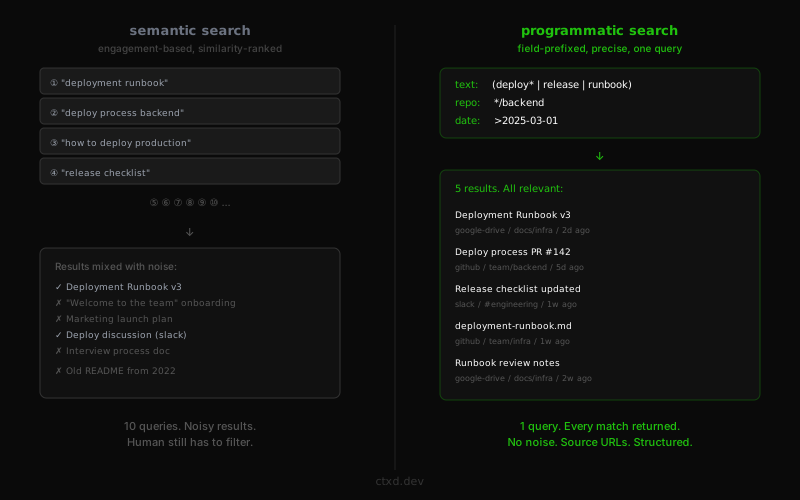
Semantic search has nothing to rank by. So it falls back to similarity. You type “deployment runbook.” It returns everything that looks vaguely related. Onboarding guides. Marketing launch plans. Old READMEs from 2022. A Google Doc titled “Process” that mentions “deploy” once in paragraph seven. Some results are right. Most are noise.
To find what you actually need, you rephrase. “Deploy process backend.” “How to deploy production.” “Release checklist.” Ten queries to get what one precise query should return.
This is the core insight. Semantic search was designed for public, high-traffic data where engagement signals do the heavy lifting. Personalized files and private enterprise data have no engagement signals. No click history. No link graph. No crowd wisdom. The ranking is meaningless. The results are noise.
Public data has been searched by millions. Your data has been searched by you.
This is what motivates a completely different approach.
From keywords to a DSL
A DSL is a domain-specific language. A small, purpose-built language for one job. SQL is a DSL for databases. Regular expressions are a DSL for pattern matching. CSS is a DSL for styling.
A search DSL is a structured language for querying data. Instead of typing keywords and hoping, you write queries with explicit operators. Think of it like SQL for your cloud files.
In SQL, you write structured queries with exact conditions. You filter by column, combine with AND/OR, match exact values or patterns. The database returns every row that matches. No guessing. No ranking by engagement.
A search DSL works the same way, but the properties are open-ended. Instead of querying fixed database columns, you query across documents, messages, issues, and files from any connected app. You filter by which app the data lives in, when it was modified, which channel or repo it came from, or which folder it sits in.
The operators are boolean. AND, OR, NOT. Exact phrase matching. Wildcard prefixes. Date ranges. You combine them the way you’d combine conditions in a WHERE clause.
The difference from SQL: the data isn’t structured into tables. It’s PDFs, Slack threads, Google Docs, GitHub PRs, calendar events. A search DSL gives you structured query operators over unstructured data.
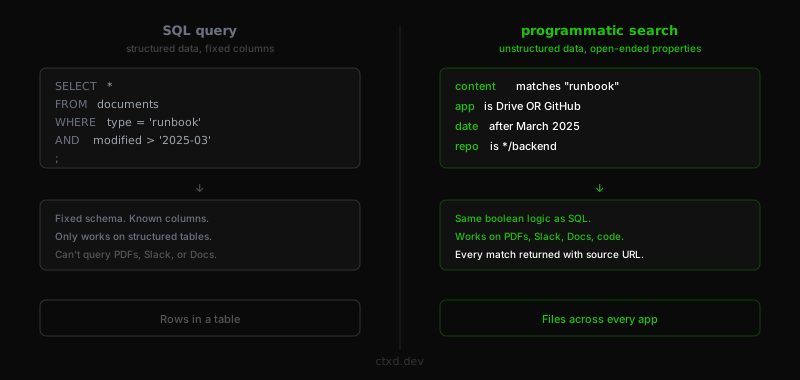
One query. Every matching document returned. From every connected app.
Personalized context
A DSL is only useful if the agent knows where to look. An agent searching for “deployment runbook” needs to know: which apps are connected? What files exist? Where are they organized?
This is what personalized context solves. Before searching, an agent can discover what data is available. Which integrations are installed. What the file tree looks like across Google Drive, Slack, GitHub, and Calendar. What accounts are connected.
This changes how the agent searches. If it sees a folder called /Projects/Infrastructure in Drive and a channel called #deployments in Slack, it knows where to aim. If GitHub is connected but Calendar is not, it doesn’t waste queries on calendar data.
The profile acts like a map. The agent reads the map, then searches with precision. It doesn’t guess which app has the answer. It knows.
This is the difference between a search engine and a context layer. A search engine takes a query and returns results. A context layer tells the agent what exists, where it lives, and then lets it query with full knowledge of the landscape.
Why this matters
Semantic search gives you results that look right. A DSL gives you results that are right.
An agent handling a support ticket doesn’t need the ten most similar documents. It needs every policy doc that mentions refunds, from the Policies folder, updated in the last 90 days. Exact match. No noise.
A coding agent investigating a bug doesn’t need engagement-ranked results. It needs every Slack message from the incidents channel in the last 48 hours that mentions the error string. Every one. Not the most popular one.
Every result links back to the source document. The agent gets a URL it can cite. This is how you build agents that don’t hallucinate. They retrieve the source. They cite it. The user can verify.
Search for agents, not humans
Human search is exploratory. You browse. You scan. You refine your query based on what you see.
Agent search is retrieval. The agent knows what it wants. It writes one DSL query with exact filters. It gets back structured data with source metadata. It uses it in its next step. No browsing. No clicking. No human in the loop.
ctxd is cloud context infrastructure. Connect your files. Search from anywhere.
Get started